Ask Questions: Reducing Premium Requests in GitHub Copilot
GitHub Copilot has a quota for the amount of so-called premium requests that you are allowed to do per month. The exact value for this quota depends on your subscription level (e.g., Copilot Pro includes 300 premium requests/month; Pro+ includes 1,500).
So what counts as a premium request? First, a request is an interaction of the user with an LLM: the user types a prompt and the LLM answers. The request handling may include an arbitrary amount of tool calls, thinking etc, but as soon as the user can type something in the chat again, the request is finished. Each LLM model in Github Copilot has an associated number called the multiplier. A request to that model counts as multiplier × 1 premium requests.
Some models, like GPT-5 mini, GPT-4.1 and GPT-4o, have a multiplier of 0 hence requests to those models do not count for the premium request quota. For models with a multiplier >0, the so-called premium models, the amount of requests is restricted per month. Examples of premium models are Claude Opus 4.5 (multiplier 3x), Claude Sonnet 4.5 (1×), and GPT-5.2 (1×). In general the premium models are the smarter models.
So for premium models it is advantageous to restrict the amount of user interaction. On the other hand for many tasks it is necessary, or at least beneficial, to have a high level of interactivity with the model while it executes its task. For example, in order to review temporary results, provide clarifications, guide the model, etc. For more complex multi-step procedures and workflows a single prompt is not enough and there is a multi-step workflow in which a human is in the loop. One simple example of this is that I often ask a model to reformulate my question according to its understanding and wait for my confirmation. For a premium model this would double the amount of premium requests spent.
The ask_questions tool
Inspired by Anthropic’s Claude Code ask_user tool I developed a tool in Python for an LLM to ask questions. Using this the LLM is able to provide user interactivity without interrupting a request: the tool is called during the request handling just like other tools such as a web search.
The tool is called ask_questions and it consists of a Python script that presents single-select, multi-select, and freeform input questions to the user according to a specification written in YAML (or JSON). Once the user has answered the questions the tool returns a map of answers given.
Example: Two Truths and a Lie
A trivial example of the tool is the following simple game that presents three statements to the user. To win, the user should find the statement that is not true. We first use the following prompt:
Let’s play Two Truths and a Lie:
- First present three trivia statements, exactly one of them false.
- Then ask me to guess which is the lie.
- When I have replied, reveal the lie and show the results.
As a result, the three statements are presented and the user is asked to make a choice in the chat, which uses up another premium request.
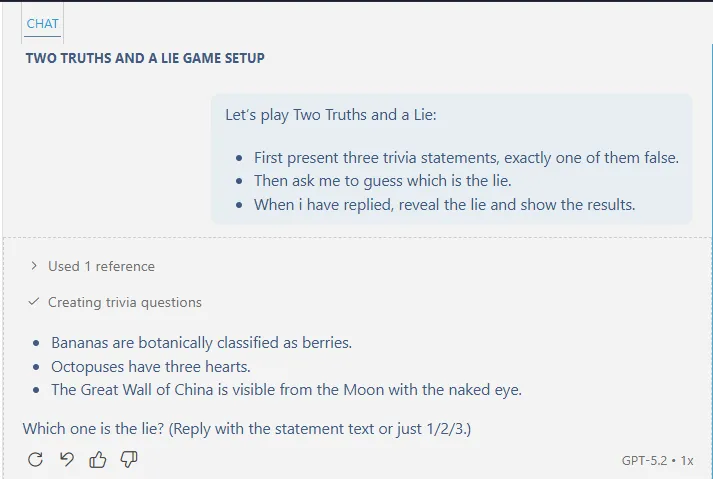
Next I added the requirement to use the ask_questions tool at the end of the prompt:
For asking questions always use the tool #file:ask_questions.py.
This gave the following result:
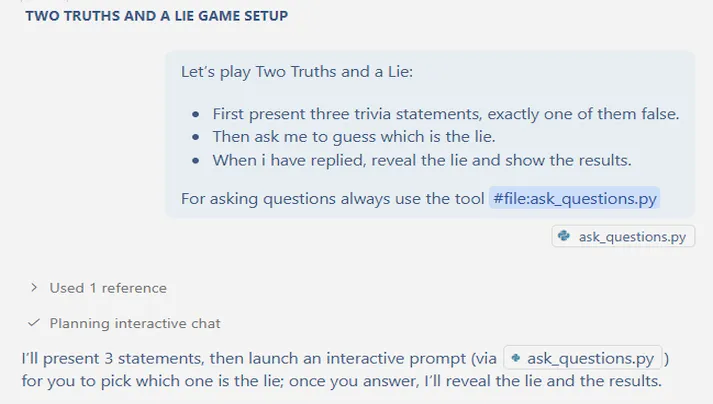
And in the terminal the following question menu was displayed while the chat waited until the tool finished execution:
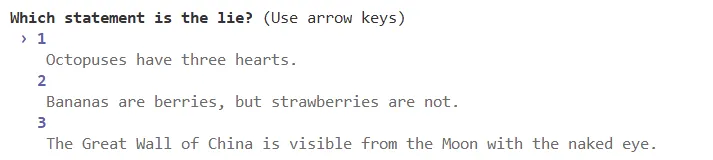
So using the ask_questions tool only one premium request was consumed.
Question specifications
As mentioned above, the ask_questions tool reads a questions specification in YAML/JSON from a file or from standard input and presents matching questions interactively to the user. After the user has answered, the tool returns a JSON dictionary with the answers.
For example, for the above example, the LLM generates this specification in YAML as input for the ask_questions tool:
questions:
  - question: Which statement is the lie?
    options:
      - value: "1"
        description: "Octopuses have three hearts."
      - value: "2"
        description: "Bananas are berries, but strawberries are not."
      - value: "3"
        description: "The Great Wall of China is visible from the Moon with the naked eye."
    key: lie
After the user has answered the question, the tool returns a JSON object mapping question key to answer as given by the user, for example:
{
  "lie": "3"
}
The tool supports various types of questions such as single-select, multi-select, and freeform.
For example, to specify a multi-select question with a freeform option:
questions:
  - question: "Which features do you want?"
    options:
      - value: "Feature A"
      - value: "Feature B"
      - value: "Feature C"
    multi_select: true
    allow_freeform: true  # optional: adds "Other" for custom input
    freeform_label: "Other (type your own)"
And to ask an open question:
questions:
  - question: "Any notes?"
    options: []
    # allow_freeform defaults to true when options is empty
Usage
The tool can be run as follows:
# From a file
python ask_questions.py --spec questions.yaml
python ask_questions.py --spec questions.json

# From stdin
cat questions.yaml | python ask_questions.py --spec -

# Validate spec without asking questions
python ask_questions.py --spec questions.yaml --dry-run
It also supports some other options which are handy for LLM usage:
# Print JSON Schema for spec format
python ask_questions.py --schema --pretty

# Print example spec
python ask_questions.py --example yaml
python ask_questions.py --example json
To tell the LLM about the tool, reference it in your prompt using VS Code’s file reference syntax: #file:ask_questions.py. The LLM will then be able to see the tool’s docstring and understand how to use it.
Example: Deterministic PRD type selection
Apart from the reduction of premium request usage, another advantage is that you can make LLM instructions more predictable (more deterministic) in their interaction with the user for fixed questions. For example, you could put the following question specification in file prd-type.yaml:
questions:
  - key: prd_type
    question: "What type of PRD is this?"
    options:
      - value: "Bug Fix"
        description: "Addressing something broken or not working correctly"
      - value: "New Feature"
        description: "Building something that doesn't exist yet"
      - value: "Enhancement"
        description: "Improving an existing feature"
      - value: "Refactor"
        description: "Technical improvements without changing behavior"
      - value: "Integration"
        description: "Connecting with external systems or services"
and tell the LLM to use it by adding to your prompt:
For asking the PRD type, run: python ask_questions.py --spec prd-type.yamlThis ensures consistent, predictable interaction regardless of which LLM model handles the request.
Conclusion
The ask_questions tool provides multiple benefits, among others:
- Reduced premium request consumption — Interactive workflows that would normally require multiple back-and-forth exchanges now complete in a single request.
- Deterministic user interaction — Fixed question specifications ensure consistent behavior across different models and sessions.
The dependencies are questionary and pyyaml. Full source can be found here.